
How to sort TikTok videos by most viewed
Updated November 24, 2026
Short answer: open the creator’s profile, stay on the Videos tab and pick Popular (next to Latest and Oldest). That puts their most watched videos first. To sort by likes, comments or shares, or to export the list, use a free Chrome extension like SortBuddy on tiktok.com.
Option 1: TikTok’s Popular tab
- Open the creator’s profile, in the app or on tiktok.com.
- Stay on the Videos tab.
- Tap Popular. The grid reorders, most watched first.
Popular is fine for a quick look. It only covers views, though, and it doesn’t tell you whether a video did well for that creator. 2M views can be a normal day for a big creator and a breakout for a small one.
Option 2: on desktop with SortBuddy (free)
- Add SortBuddy to Chrome. No sign-up.
- Go to tiktok.com and open the creator’s profile (
tiktok.com/@username), on the Videos tab. - Click the SortBuddy icon. The first time, click Enable TikTok sorting once.
- Choose how many videos to sort: the latest 25, 50, 100, 200, or all videos.
- Choose Views (or Likes, Comments, Engagement or Shares) and click Apply Sort.
Keep the tab open in front while it sorts. Every video shows its views, likes, comments, shares and the date it was posted.
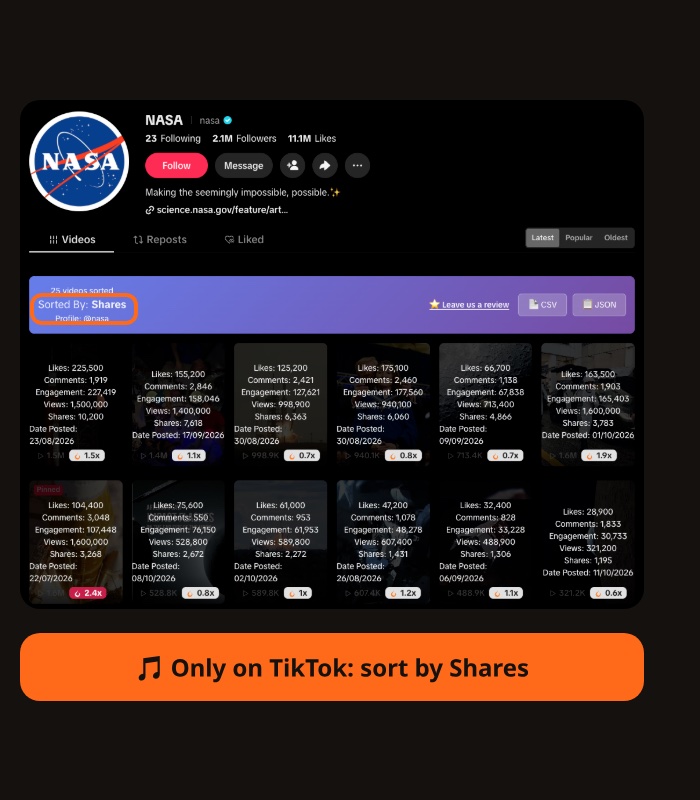
Why sort by shares
Views tell you what TikTok pushed. Shares tell you what people sent to a friend, which is usually the stronger sign that an idea landed. A video with average views and lots of shares is often a better idea to adapt than the most viewed one.
TikTok shows a share count on every video, but there’s no way to sort by it in TikTok. SortBuddy adds that sort.
Most viewed vs. outliers
On a creator who has grown a lot, the most viewed videos are often recent ones, posted when they already had a big audience. The video that made them grow can sit far down the list.
SortBuddy gives every video an outlier score: how it did against the videos posted around it. 4.2x means four times the views of the videos around it. Look for 3x and up to find the ideas that worked beyond the creator’s usual audience.
What to do with the list
- Sort 5 to 10 creators in your niche, including some smaller ones.
- Note the videos with the highest outlier scores and the most shares.
- For each one, write down the hook (the first line or first two seconds), the format and the topic.
- Make your own version with your angle. Don’t copy the video.
To keep notes, export the sorted list to CSV or JSON and add a column for the hook.
Frequently asked questions
Does TikTok let you sort videos by views?
Partly. A profile's Videos tab has Latest, Popular and Oldest. Popular puts the most watched videos first, but you can't sort by likes, comments or shares, and it doesn't show you which videos beat the creator's usual numbers.
Can I sort someone else's TikTok, or only my own?
Any public creator. TikTok's Popular tab and SortBuddy both work on other people's profiles.
Can I sort TikTok videos by shares?
Not in TikTok itself. SortBuddy sorts any creator's videos by shares, as well as views, likes, comments and engagement.
Does sorting a TikTok profile tell the creator?
No. Sorting only changes what you see on your screen.
Does it work on the TikTok app?
Popular works in the app. SortBuddy is a Chrome extension, so it works on tiktok.com on a computer.