
How to sort Instagram reels by views
Updated November 24, 2026
Short answer: in the Instagram app, open a profile, go to its Reels tab and pick Most viewed from the sort menu, if your account has it. On a computer, or if you don’t see the option, use a free Chrome extension like SortBuddy: open the profile’s Reels tab, choose Views and click Apply Sort.
Option 1: in the Instagram app
- Open the profile you want to check (yours or anyone’s public account).
- Tap the Reels tab (the clapperboard icon above the grid).
- Tap the Reels icon again, or the small arrow next to it, to open the sort menu.
- Choose Most viewed. The grid reorders from the highest view count down.
Instagram is rolling this out gradually, so not every account has the menu yet. If you don’t see it, update the app. It isn’t on Instagram’s website at all.
The app sort is fine for a quick look. It only sorts by views, though, and it doesn’t tell you whether a reel did well for that account. 500K views is a flop for a 5M-follower creator and a breakout for a 20K one.
Option 2: on desktop with SortBuddy (free)
SortBuddy is a free Chrome extension that sorts any public profile’s reels. It works on desktop, where Instagram has no sort option.
- Add SortBuddy to Chrome and pin it to your toolbar (puzzle-piece icon → pin).
- Go to instagram.com and open the profile’s Reels tab (
instagram.com/username/reels/). - Click the SortBuddy icon.
- Choose how many reels to sort: the latest 25, 50, 100, 200, or all reels.
- Choose Views and click Apply Sort.
SortBuddy scrolls through the grid and reorders it, biggest hits first. Press Esc at any time to stop.
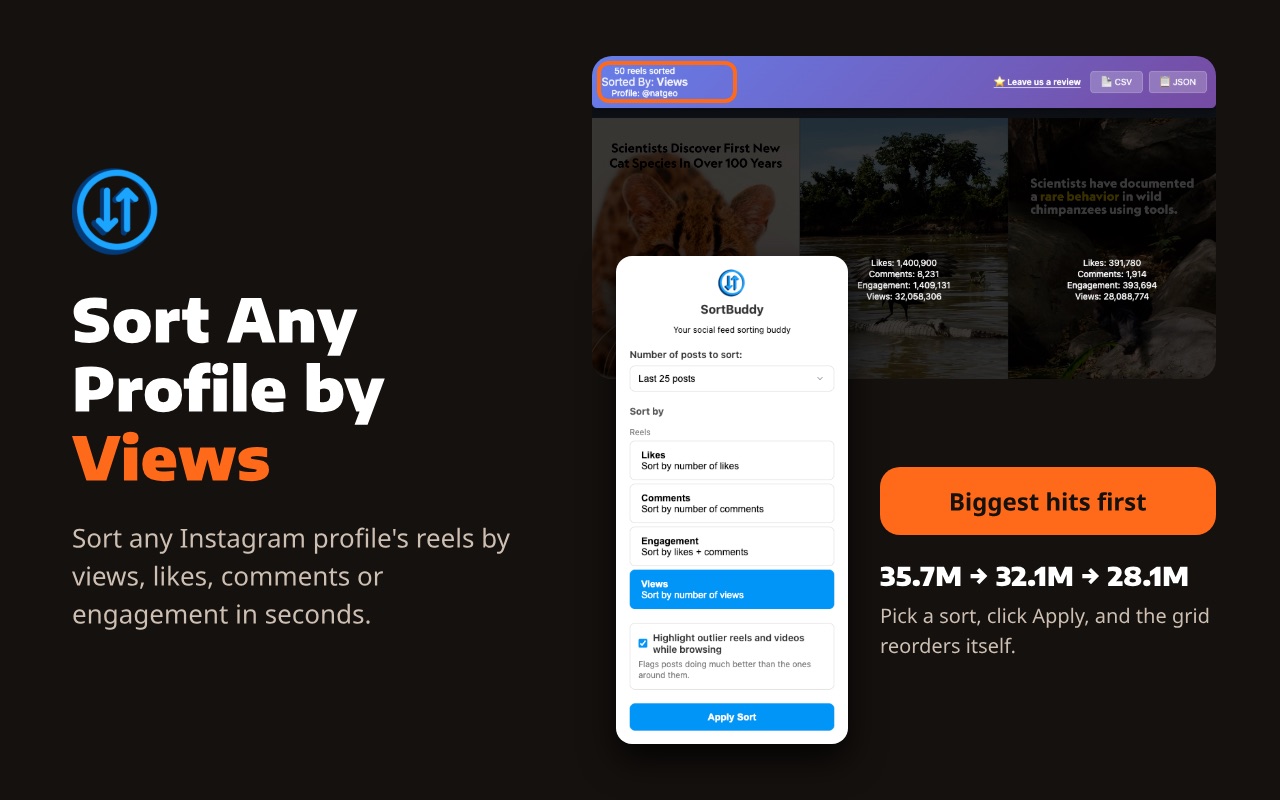
What you get on top of a plain view sort:
- More sorts: views, likes, comments or engagement (likes + comments). On the main posts grid: likes, comments or engagement.
- Outlier scores: every reel shows how it did against the reels posted around it, like 3.2x. Anything 2x and up is highlighted as you browse, so an account’s real hits stand out even if it has grown a lot since.
- Export: download the sorted list as CSV or JSON (views, likes, comments, outlier scores) for a spreadsheet.
- TikTok too: the same sorts on any TikTok creator’s Videos tab, plus sort by shares (click Enable TikTok sorting once the first time you use it on TikTok).
App or extension: which to use
| Instagram app | SortBuddy | |
|---|---|---|
| Works on | Phone (some accounts) | Desktop Chrome |
| Sort by | Views | Views, likes, comments, engagement |
| Outlier score per reel | No | Yes |
| Export to CSV / JSON | No | Yes |
| TikTok | No | Yes |
| Price | Free | Free, no sign-up |
Tip: sort by views, then look at the outliers
The most viewed reels on a big account are often recent posts that got pushed because the account was already huge, or one-off viral spikes from years ago. To find ideas worth adapting, look for reels that beat the reels around them: that’s what the outlier score measures. A 10x reel on a small account in your niche is often a better format to adapt than a big account’s top reel.
Frequently asked questions
Why don't I see the "Most viewed" option on Instagram?
Instagram is rolling the Reels tab sort out gradually, so some accounts don't have it yet. Update the app and check again. If it's still missing, or you're on a computer, use a desktop extension like SortBuddy.
Can I sort reels by views on Instagram's website?
Not with Instagram's own tools. The website has no sort option. A Chrome extension like SortBuddy adds one to any profile's Reels tab.
Can I sort someone else's reels, or only my own?
Any public profile. Instagram's app sort and SortBuddy both work on other people's accounts, not just yours.
Can I sort reels by likes or comments instead?
Instagram's app only offers views. SortBuddy sorts reels by views, likes, comments or engagement (likes plus comments).
Does sorting a profile tell the account owner?
No. Sorting only changes what you see on your screen.